Voice workout tracker
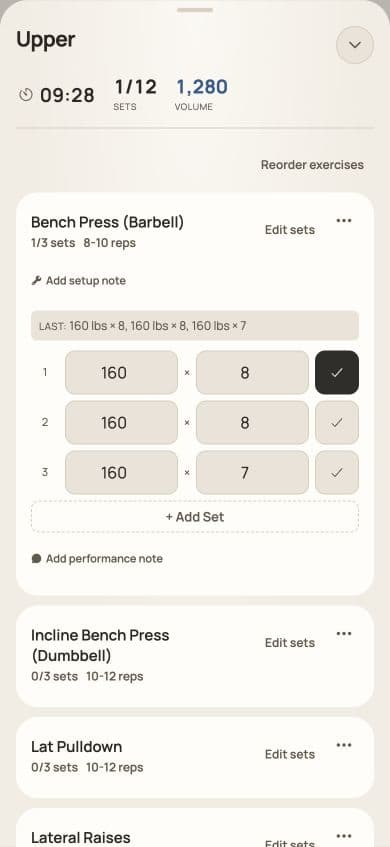
In the LiftLabb iOS app you can log a set by saying it. Tap the mic during a workout, say "225 for 8", and LiftLabb fills in the weight and reps. You check the numbers and tick the set off yourself.
How it works
- Open a workout and tap the mic button. The first time, iOS asks for microphone and speech recognition permission.
- Say the set. Tap the mic again when you're done. Recording also stops on its own after 2 minutes.
- LiftLabb fills the weight and reps into the next unchecked set. Name an exercise that's in the workout and the sets go there. Otherwise they go to the first exercise that still has unchecked sets.
- Check the numbers, then tick the set off. Voice never ticks a set off for you.
What you can say
| You say | LiftLabb logs |
|---|---|
| "225 for 8" | One set: 225 × 8. |
| "225 for 8, 8, 7" | Three sets at 225: 8, 8 and 7 reps. |
| "two twenty five for eight" | 225 × 8. Spoken numbers work too. |
| "225 for 8 at 2 RIR" | 225 × 8 with 2 reps in reserve. |
| "225 for 8 to failure" | 225 × 8, marked as taken to failure. |
| "60 pounds for 9 and then 60 pounds for 4" | Two sets: 60 × 9 and 60 × 4. |
| "two plates for 8" | In pounds only: a 45 lb bar plus two 45s a side, so 225 × 8. |
| "leg press 300 for 6 and 300 for 4" | Two sets on Leg Press, if it's in the workout. |
Exercise names are matched on their first two words. Saying "pounds" or "kg" is fine, but it doesn't convert anything: the number goes in using the weight unit set in the app. Say more sets than there are unchecked rows and LiftLabb adds rows. Commands are in English.
When it mishears
Example, not a real workout
You say "two twenty five for eight". The phone hears "two twenty five for eighty", so the set fills in as 225 × 80. Tap the reps field, type 8, then tick the set off.
A wrong weight works the same way: tap the weight field and type the right number. If the phone can't make sense of what it heard at all, nothing is filled in. Type the set, or allow the optional online help described below.
What it needs
- The iOS app. Voice logging is in the iOS app only. The web app at app.liftlabb.ca logs by tapping.
- An iPhone that supports Apple's on-device speech recognition. Commands are in English. Apple doesn't offer on-device recognition for every language or accent, so how well it hears you depends on your iPhone and its language settings. If it can't hear you properly, type the set.
- Microphone and speech recognition permission.
Transcription and the built-in parser run on your iPhone. If the phone can't parse what you said, the app can offer optional online help. It only runs if you agree to it in the app, it sends the transcribed text, never the audio, plus the exercise names in your workout, and it needs a connection. Say no and nothing is sent. The app's own disclosure and our Privacy Policy cover what's sent and who processes it. You can turn voice logging off in the app's Settings.
The screen it fills in
What it costs
LiftLabb is a paid monthly or annual subscription: US$2.99 a month or US$19.99 a year, voice logging included. Eligible new customers may get a 7-day free trial before billing. Apple or Stripe shows your local price, taxes, renewal terms and trial eligibility before you buy.
Try it
The iOS app is in beta through TestFlight, and voice logging is only in the iOS app.
More in the FAQ, or read our Terms of Service and Privacy Policy. To change whether this website uses analytics, open .